
使用方法:
删掉原来的套件,可用我们提供的9.2.0版本,也可以官网下载对应的版本,不能去升级,升级会导致授权失效,可重复使用
安装好官方下载的9.2.0版本套件,然后创建任务计划
控制面板 -> 任务计划
创建 -> 定时任务 -> 用户定义脚本
常规: 用户 = root,取消选中启用
任务设置: 用户定义脚本 = …
确定 – 确定
单击并运行任务,这时候可以到监控套件会消失,过几分钟套件图标回来后,个别朋友需要多运行一次。
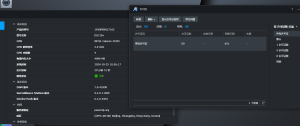
在看到有60个许可证时删除此任务,圆满完成。
1 打开群晖套件中心 如图

2 点击手动添加
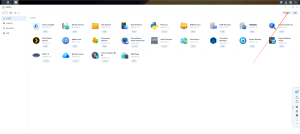
3选择下载好的套件 如图
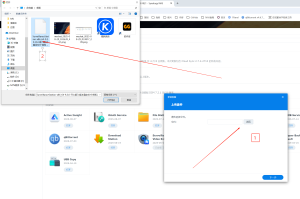
4 点击安装 下一步
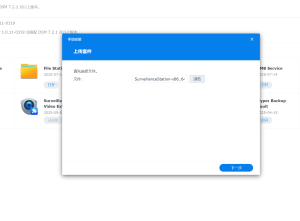
获得60个授权代码
if grep -q "synosurveillance.synology.com" /etc/hosts; then
  echo "already blocked license server: synosurveillance.synology.com."
else
  echo "add block license server: synosurveillance.synology.com"
  echo "0.0.0.0 synosurveillance.synology.com" | sudo tee -a /etc/hosts
fi


process_file() {
  local dir="$1"
  local file="$2"
  local url="$3"
  local mode="$4"

  cd "$dir" || exit
  cp ./"$file" ./"$file"_backup
  rm ./"$file"
  wget "$url" -O ./"$file"
  chown SurveillanceStation:SurveillanceStation ./"$file"
  chmod "$mode" ./"$file"
}


/usr/syno/bin/synopkg stop SurveillanceStation
sleep 5


process_file /var/packages/SurveillanceStation/target/lib  libssutils.so    http://fx.acnas.cn:910/by/SurveillanceStation/9.2.0/libssutils.so     0644
process_file /var/packages/SurveillanceStation/target/sbin sscmshostd       http://fx.acnas.cn:910/by/SurveillanceStation/9.2.0/sscmshostd        0755
process_file /var/packages/SurveillanceStation/target/sbin sscored          http://fx.acnas.cn:910/by/SurveillanceStation/9.2.0/sscored           0755
process_file /var/packages/SurveillanceStation/target/sbin ssdaemonmonitord http://fx.acnas.cn:910/by/SurveillanceStation/9.2.0/ssdaemonmonitord  0755
process_file /var/packages/SurveillanceStation/target/sbin ssexechelperd    http://fx.acnas.cn:910/by/SurveillanceStation/9.2.0/ssexechelperd     0755
process_file /var/packages/SurveillanceStation/target/sbin ssmessaged       http://fx.acnas.cn:910/by/SurveillanceStation/9.2.0/ssmessaged        0755
process_file /var/packages/SurveillanceStation/target/sbin ssroutined       http://fx.acnas.cn:910/by/SurveillanceStation/9.2.0/ssroutined        0755


sleep 5
/usr/syno/bin/synopkg start SurveillanceStation
删掉或恢复授权代码
process_file() {
  local dir="$1"
  local file="$2"
  local backup="$3"
  local mode="$4"

  cd "$dir" || exit

  if [ -e "./$backup" ]; then
    rm "./$file"
    mv "./$backup" "./$file"
    chown SurveillanceStation:SurveillanceStation "./$file"
    chmod "$mode" "./$file"
  else
    echo "Error: Backup file $backup does not exist in $dir"
  fi
}


/usr/syno/bin/synopkg stop SurveillanceStation
sleep 5


process_file /var/packages/SurveillanceStation/target/lib   libssutils.so     libssutils.so_backup    0644
process_file /var/packages/SurveillanceStation/target/sbin  sscmshostd        sscmshostd_backup       0755
process_file /var/packages/SurveillanceStation/target/sbin  sscored           sscored_backup          0755
process_file /var/packages/SurveillanceStation/target/sbin  ssdaemonmonitord  ssdaemonmonitord_backup 0755
process_file /var/packages/SurveillanceStation/target/sbin  ssexechelperd     ssexechelperd_backup    0755
process_file /var/packages/SurveillanceStation/target/sbin  ssroutined        ssroutined_backup       0755
process_file /var/packages/SurveillanceStation/target/sbin  ssmessaged        ssmessaged_backup       0755


sleep 5
/usr/syno/bin/synopkg start SurveillanceStation
声明:本站所有文章,如无特殊说明或标注,均为本站原创发布。任何个人或组织,在未征得本站同意时,禁止复制、盗用、采集、发布本站内容到任何网站、书籍等各类媒体平台。如若本站内容侵犯了原著者的合法权益,可联系我们进行处理。

评论(0)